Sunday, 9 September 2018

5 Best Slow Motion Video Apps For Android

5 Best Slow Motion Video Apps For Android


In real life, it is practically impossible to control time. But in reel life, the power is in the hands of the person making it. And we literally see those examples in almost every movie or TV show. Whenever there is a shot where the filmmaker wants to put more impact in the minds of audience they just slow it down. As slow motion videos create drama and scenic moments. The way slow-motion videos works is that they make a recording run slower than it was originally recorded. So that the action appears much slower in real life too. Which is great for pointing out every minute detail of a scene.


Be it filmmakers, photographers, or just casual people, everyone is getting deep into the art of slow-motion videos. And for this many Android smartphones has an inbuilt slow-mo feature within their camera itself. But if you are someone who doesn’t have this feature on your smartphone or you just want something more specific to work. Then check out this 5 Best Slow Motion Video Apps For Android which will not only make your videos cooler but make it more creative and impactful.

Worth Reading: How to Make Video to Gif on Android

Must Check Out Posts:

How to Fix Google Backup and Sync Not Working on Android

How to Download Music from Pandora on Android

How to Fix Snapchat not Working on Android?

The Top Best Photo Gallery for Android

How to Fix Android won’t Turn On or Charging

The Best Android Backup Apps 2019
Best Slow Motion Video Apps For Android:


Slow Motion Video FX


Efectum


Videoshop


Coach’s Eye


Hudl Technique
1. Slow Motion Video FX

Make creative slow-mo videos and show it to your friends and family on social media with the help of Slow Motion Video FX. The app not only slows the time of your video but you can also record your speech and make it slow. Record your pets, spitting water, or just anything that comes to your mind. So turn your ideas into a stunning masterpiece with the Slow Motion Video FX app.


Main Features:


Record your speech and make it slow.


Slow motion and fast motion video.


Upload directly to social networking sites.

Download
2. Efectum

Get a full-featured video editor and create amazing shots with Efectum. Shoot a video directly from the app or adjust the speed of any video from your gallery. Simply slow down the video or speed it up. You just need to control the video frame and can even add your favorite music. So get your hands on a variety of functions and watch your video become something else with Efectum app.


Main Features:


Multiple speed.


All popular video formats are supported.


Easy to use.


Save and share on social networks.

Download

Gihosoft Android data recovery Free is a super awesome software specialized in Android file recovery. With this program, you are able to recover deleted photos, music, videos, messages, contacts, call logs, WhatsApp messages, Viber chat history and more from Samsung, Huawei, LG, HTC, Motorola, Google, Oneplus, Sony, Lenovo, ZTE and other Android devices directly. Meanwhile, this Android data recovery software is available for both Windows and Mac platforms.For now, check:Free iTunes/iPhone Backup Extractor for iPhone, iPad

Jihosoft iTunes Backup Extractor free is a powerful tool to recover and extract important data from iPhone, iPad & iPod touch backup on Windows or Mac.
3. Videoshop

Videoshop is a video editing app which is fully loaded with features and functions that will make your video stunning than ever before. You can make your video in slow motion as well as fast by just adjusting the speed of your video. Also not just the speed but you can even add filters, texts, animated titles, transitions and so much more. Share on your favorite social media channels and display your masterpiece to everyone out there.


Main Features:


Slow motion (or fast motion).


High-resolution videos.


Sound effects.


Adjust Display.

Download
4. Coach’s Eye

Coach’s eye is an application which will help you to improve your performance with utmost precision. This is an app which is widely used by coaches and athletes to review athlete technique and game film. The way these app works is that you need to record a video while playing. And the app will instantly slow it down so that you know where you have to improve your skills. So review your performance immediately and correct it right on the field with Coach’s Eye.


Main Features:


Film and analyze players right on the ice.


Self-correction & self-development.


See your performance.

Download
5. Hudl Technique

Hudl Technique is an app which is used by players to improve their performance by slow motion video analysis. Simply use your camera to record while practicing, racing or playing a game and the app will slow it down frame by frame so you see every minute detail. It also records videos in HD quality and has an option to zoom in for a closer look. So analyze your playing skills and start improving today with the Hudl Technique app.


Main Features:


Playback in slow motion, frame by frame.


Zoom and pan for a closer look at every detail.


Synchronize comparison videos for a more effective evaluation.

Download


If you find this article helpful or interesting do like and comment your views in the comment box.


Jihosoft Android Data Recovery is the most powerful and professional data recovery software for Android that can restore deleted or lost contacts, photos, videos, audios, SMS, call logs, WhatsApp chat, Viber messages from any Android devices due to accidental deletion, virus attack, formatting. It supports all popular Android smartphones and tablets like Samsung, HTC, LG, Huawei, Motorola, Nexus, etc. In the meantime, you will be guided step by step if you never used this kind of tool before.


Best Samsung Data Recovery Software: Easily Recover Deleted/Lost Photos, Messages, Contacts, Call Logs, WhatsApp,
Musics, Videos etc. from All Samsung Devices


Monday, 3 September 2018

6 Best VR Player Apps For Android In 2019


Virtual Reality or commonly called as VR is a computer simulation that allows the viewers to see three-dimensional and realistic images. It is yet another feather in the cap of technological advancement. As it allows humans to explore imaginary places. VR’s natural style of interaction allows participants the feeling of being immersed in the simulated world. The way VR headset works is that it blocks out all external light. And shows you an image on high-definition screens in front of your eyes. It is like a pair of goggles that you wear over your eyes. VR headsets mostly present two offset images separately to the left and the right eye of the viewer. Which ultimately combines in the brain and give the perception of 3D depth.


And although VR is basically used with computers in tethered approach. But the untethered approach is actually gaining a wide popularity because it is completely portable. And can be easily used with your Android smartphones too. Because Daydream technology is finally available for Android. But first to get the proper real-life experience of VR you need to get your hands on VR players. Also due to this, the number of videos being created in VR format is also increased massively. So sit back and check out this 6 Best VR Player Apps For Android that will help you to get the best 3D experience within your smartphone.


Worth Reading: How to Check Android Phone is Locked or Unlocked
6 Best VR Player Apps For Android:


Cardboard


YouTube


Fulldive VR


VR Player


KM Player


Within
1. Cardboard

Cardboard is a Google-developed app which gives you virtual reality experience on your Android smartphone. All you need is a Cardboard viewer to enjoy this app at full extension. In Cardboard app, you can find various demos to try out. Some demos will let you fly over the earth, others will take you on a guided tour of Versailles, and many such more. So to construct a virtual reality world within your smartphone get the Cardboard app.


Main Features:


Included demos.


Launch your favorite VR experience.


Set up a viewer.


2. YouTube

The technology of VR reality is latching to every corner of the digital world. So why should YouTube be left behind? Especially when the Daydream technology has made it available for Android. As now you can enjoy VR apps if you have a cardboard that will give you a deeper surfing experience. YouTube has adapted VR technology which lets you watch VR videos over your smartphones with the best 3D experience. You can watch any video in VR mode but the best-recommended ones are the videos which are in the 360-degree view. So enjoy immersive videos on YouTube which add you to another dimension when you are watching them.


Main Features:


Browse personal recommendations on the Home tab.


Find any videos you love in a quick and easy way.


Create your playlist.


3. Fulldive VR

Watch over 1 million videos in 360-degree and play over 500 games with the help of Fulldive VR. The app is compatible both for Cardboard and Daydream headsets. It is not just a platform for experiencing virtual reality. But is also a social platform where you can connect with your friends and can share your favorite videos with them. The app allows you to browse and view a new generation of media such as watching 3D and 360 photos and videos. So watch the best content from approved sources and enjoy 100% user-generated virtual reality with the Fulldive VR app.


Main Features:


Play all videos on your phone like in a movie theater.


Browse anything on the internet in VR.


Take pictures in VR.


Store and access your 360 photos.


4. VR Player

VR Player is an easy to use application which uses VR BOX or VR Headset for creating a virtual reality effect. And the best part is that it is compatible with all type of cardboard like Vr box, Google Cardboard etc. Also, don’t worry if your phone is not that high-tech because VR Player doesn’t require many sensors which makes it simple to work. So enjoy full HD movies smoothly without any lagging in the VR format with VR Player app.


Main Features:


4K support.


Movable Subtitles.


A very simple user interface.


Plays almost all the formats without any lag.


VR mode and normal mode for videos.


5. KMPlayer VR

Enjoy fabulous 3D world anywhere and anytime you want with the KMPlayer VR application. The app has a simple and clean user interface which makes it easy for anyone to use it. It supports VR formats such as VR formats such as mp4, mkv, mov, and flv etc. Also, it is compatible with most VR headsets so that you never run out of options. So, enjoy this newly released VR video player which is trusted by 300 million people around the world.


Main Features:


360-degree video playback.


VR glasses mode.


Watch VR videos on the web just by its URL.


6. WITHIN

Enjoy premium story based immersive content in a variety of genres made by the world’s finest VR creators with the help of the WITHIN app. Without a viewer make your device a 360-degree magic window. Which gives you the finest VR experience as you move it around to see the scene. just make sure you use headphones or earbuds for realistic 3D spatial VR audio. So enjoy the future of story-telling with the WITHIN app.


Main Features:


Innovative, entertaining, and informative content.


Works with Google Cardboard and Google Cardboard-certified viewers.


Related Posts:

The Best Android Backup Apps 2019How to Restart Android without Power Button

How to Fix Android won’t Turn On or Charging

The Best Photo Album Maker Apps with Songs

The Top Best Photo Gallery for Android

How to Make Video to Gif on Android


If you find this article helpful or interesting do like and share your views in the comment box.


Jihosoft Android Data Recovery is the most powerful and professional data recovery software for Android that can restore deleted or lost contacts, photos, videos, audios, SMS, call logs, WhatsApp chat, Viber messages from any Android devices due to accidental deletion, virus attack, formatting. It supports all popular Android smartphones and tablets like Samsung, HTC, LG, Huawei, Motorola, Nexus, etc. In the meantime, you will be guided step by step if you never used this kind of tool before.


Best Samsung Data Recovery Software:
Easily Recover Deleted/Lost Photos, Messages, Contacts, Call Logs, WhatsApp,
Musics, Videos etc. from All Samsung Devices


Tuesday, 28 August 2018

6 Best Lock Screen Apps For Android 2019


Screen lock is generally a security feature that helps prevent unauthorized access to the device. And honestly, screen lock is the only screen you will forever visit on your android device. Because every time you pick up your smartphone you have to do something on the lock screen to go any further. Be it a simple swipe, pin code, password, or any other level of security you have selected. So for this utmost important part of your device, you surely don’t want to take any risk. And because of which there are many third-party lock screen apps to assist you.


Although every mobile has their inbuilt lock screen. But most of them lack in customized features. And as this is the first screen you see, so why not to make it more personalized according to your style. As many of the third-party lock screen apps give you better functionality, beautiful wallpapers, themes, and much more. So secure your mobile from nosy people and save your data with this 6 Best Lock Screen Apps For Android.

Worth Reading: Best Screen Recorder Apps for Android
6 Best Lock Screen Apps For Android:


CM Locker


Gesture Lock Screen


Floatify Lockscreen


Next Lock Screen


Hi Locker


LokLok
1. CM Locker

CM Locker is a security lock screen app which will let you give your device a pleasant new look with tons of customization options. Once you set CM Locker as your default lock screen, you can start customizing its features. Later choose the type of protection you want such as a pin code, pattern password, or fingerprint lock. The app also lets you automatically change your wallpaper and theme every day. Also, it has an anti-intrude feature which snaps the photo of any person who puts the wrong password on your device. So make your life easier and protect your device with CM Locker.You may also like:

Gihosoft Total Video Converter is a professional all-in-one video tool that enables you to convert videos and audios into various different formats.


Main Features:


Anti-theft protection.


Intruder selfie.


Personalization.


Notification reminder and instant reply.


2. Gesture Lock Screen

Gesture lock screen as the name suggests lets you unlock your device with a unique gesture set by you. Just draw something whether it be numbers or letters and you are good to go. Not only gesture you can also set a fingerprint or pin code to unlock your device. It also sends intruder alert and photo to your email address when someone tries to enter your device with a wrong gesture. Also, the app has tons of customization options to select from that will make your smartphone more delightful. So easily unlock your smartphone with a personalized gesture with Gesture Lock Screen.


Main Features:


Gesture.


Intruder selfie.


Hide sensitive notification content.


Enter recovery password to unlock in case you forgot the gesture.


3. Floatify Lockscreen

Get professional themes, style and heads-up notifications with the Floatify Lockscreen app. It is the only app that can mark messages as read. Also, you can directly send messages from the notification bar and also can reply with a predefined message without even typing. The app also has a smart wake up setting which will turn on your screen as soon as you pick up your mobile. So add your favorite widgets to your lock screen and enjoy unlimited customized opportunities with the Floatify Lockscreen app.


Main Features:


Quick and direct reply.


Heads-Up notification popups.


Music controls for the lock screen.


Custom backgrounds, animations, icons, text.


4. Next Lock Screen

Next Lock Screen is developed by Microsoft which lets you customize your smartphone with an ultimate look. Set this app as your default lock screen. And then simply choose your protection type with a PIN or pattern code and also with a fingerprint that works on hardware supported devices. Get beautiful wallpapers every day to set on your screen or use pictures from your own gallery. So get your hand’s on interesting and simple features that will give your lock screen an elegant look with the Next Lock Screen app.


Main Features:


Custom Unlock.


Easily call or text your favorite contacts from the lock screen.


Quick access to the Camera, Flashlight, Wi-Fi, Bluetooth, and more.


Launch your favorite apps with their built-in app launcher.


5. Hi Locker

Hi Locker is an app that gives you total control over your lock screen with 3 unlock styles i.e Classic, Lollipop, iOS. The app has numerous customization options with blur and automatically changing wallpapers. You can either unlock your device with a password, pin or even by drawing. Also with Hi Locker, you can choose which apps can show notifications on the lock screen and which ones can’t. So customize your lock screen according to your style and get a great number of excellent features with the Hi Locker app.


Main Features:


You can enter your name or favorite status on the lock screen.


Drag “the dot” to circle lock or double tap to on “the dot” to unlock the lock screen.


Automatically change wallpaper after a period of time.


Hide notification on lock screen.


6. LokLok

LokLok is not just a lock screen app but instead, it is a global community of people all around. How it works is that it replaces your Android lock screen with a whiteboard that is always in sync between you and whoever you are connected to. So that when someone changes their lock screen it automatically updates on everyone else. It basically gives you a whiteboard on which you can draw and erase whatever you like. So, add colors, cool fonts to make your drawing more fun for you and others with this LokLok draw on a lock screen app.


Main Features:

Draw on your phone without unlocking it.

Use it with your significant other or a group of close friends and stay in touch throughout the day.


Works as a lock screen and as a widget.


Share your masterpieces on social media with the #loklokapp hashtag.


Must Check Out Posts:

How to Check Android Phone is Locked or Unlocked

What to Do If Your Google Play Store Stops Working?

How to Recover Data after Factory Reset on Android

How to Enable USB Debugging on your Android Device

How to Backup Android Data without Root?

How to Root Android Phones and Tablets


If you find this article interesting or helpful then do like and post your reviews in the comment box.


Jihosoft Android Data Recovery is the most powerful and professional data recovery software for Android that can restore deleted or lost contacts, photos, videos, audios, SMS, call logs, WhatsApp chat, Viber messages from any Android devices due to accidental deletion, virus attack, formatting. It supports all popular Android smartphones and tablets like Samsung, HTC, LG, Huawei, Motorola, Nexus, etc. In the meantime, you will be guided step by step if you never used this kind of tool before.


Monday, 20 August 2018

5 Best Quit Smoking Apps For Android Users 2019

5 Best Quit Smoking Apps For Android Users 2019

Best Quit Smoking Apps For Android Users:


Smoke-Free


Quit Tracker


QuitNow


Stop Smoking


SmokeFree by MotivBite
1. Smoke-Free

With over 1 million users who have downloaded this app as a step towards a new life, this app proven to be a huge success. You can get the help you need to quit smoking and can also help others stop too. This is a science built app with proven techniques to help you quit smoking and are delivered in a beautifully clear and a very human way. The inbuilt calculator helps you in knowing how much money you have saved not smoking and how many smokes you have not smoked. You can also use the diary to jot down your cravings or list down your achievements.

You can slowly see how your health is improving too.


Main Features:


Record your cravings.


Share your success.


Earn badges for your progress.

Download
2. Quit Tracker

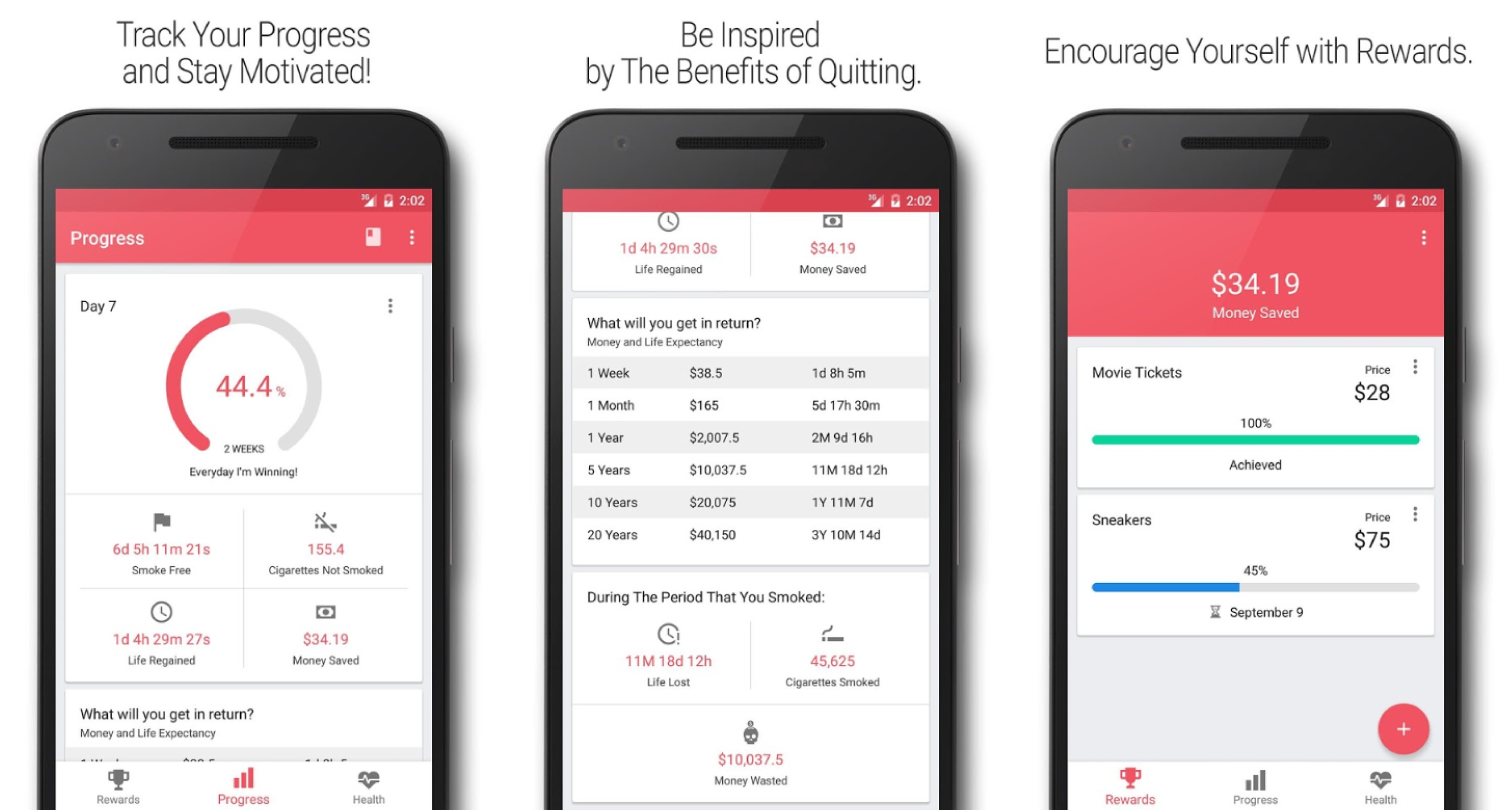
Do you need support or motivation in the journey that you have just started of quitting smoking, then this app would be your perfect companion to take alongside. Quit tracker is a high-quality app that helps you figure out how much money you have spent or saved by quitting. It will also let you know the amount of life you regained by not smoking.

This is the motivation tool for those of you who want to break this awful habit right now but find it hard to do so. There is also a health tab where you can see the positive effects that quitting has on your body.


Main Features:


Track how close you are at quitting.


Obtain rewards.


View your timeline.

Download
3. Quit Now

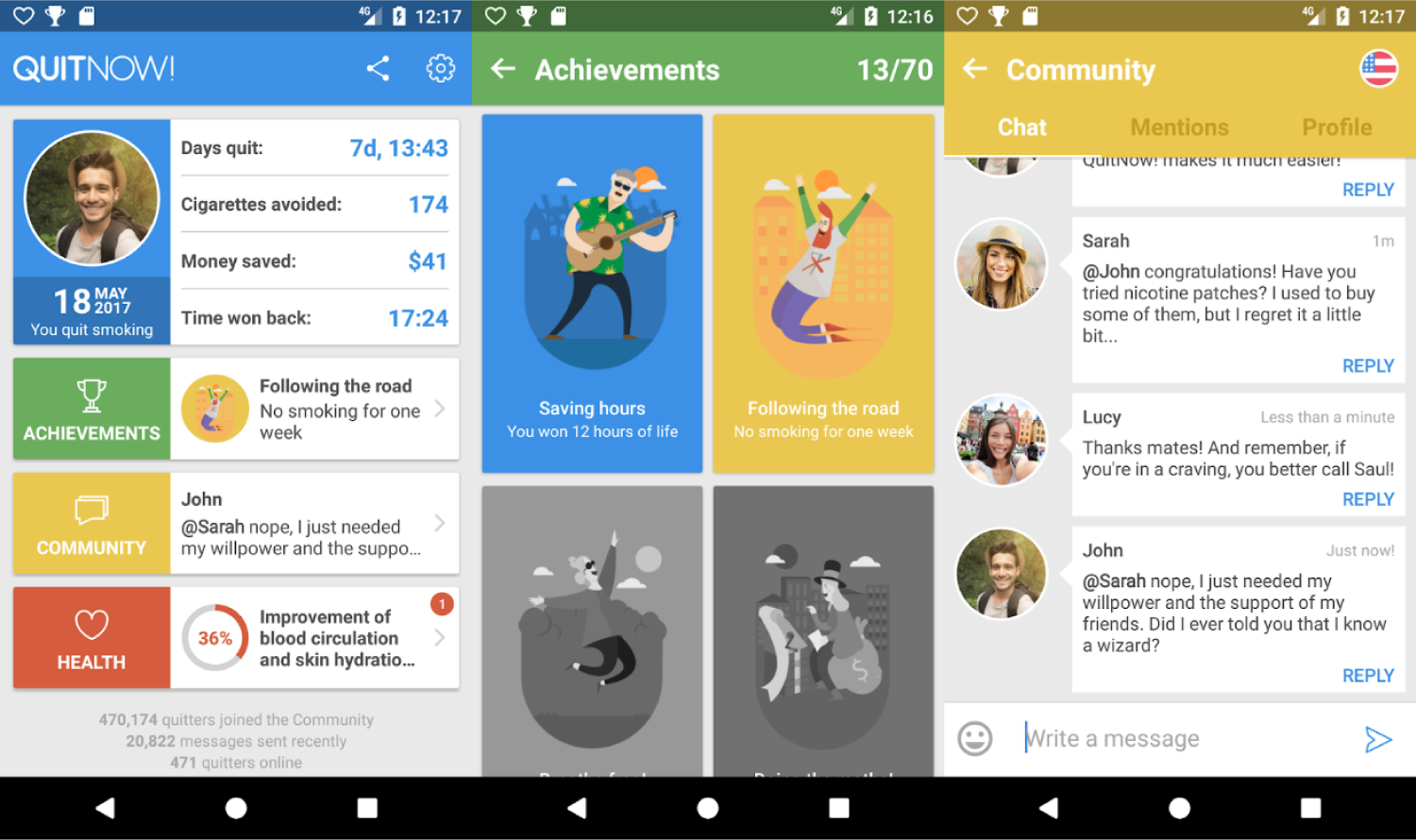
Quitting smoking is more about will, and remember it will take some time but it does not make you weak it’s a step you are taking at being strong. Quit now is a community of 2 million people who have managed to stop smoking by receiving and giving help through messages via their chat room.

This app is here to hold your hand through this difficult time and to help you avoid the temptation.


Main Features:


Diary of your daily drags.


The evolution of your health improvements as per as WHO indications.

Download
4. Stop Smoking

Easy quit is a free application that can help you get your hands off that cigarette and make sure you never yellow your fingers again. With great features made in order to help you out like money statistics that help you tackle your money wasted or saved on this habit, with also a memory game that you can play when you have cravings and avoid them.


Main Features:


Personal motivations.


Scientific tips.


Privacy secured.

Download
5. Smoke-Free by Motivbite

This app is personalized to your choices and habits. If you are highly motivated you can choose quit mode and if you need more time there is reduce mode. The most important thing is your desire to quit. You can create your own quitting plan, track your progress, with motivational tips with videos, images, and quotes.


Main Features:

Dashclock widget.

Data synchronization between all your devices.

Facebook integration like share and send.

Download
There is nothing that you can’t do in life, quitting smoking can be one of them. Make sure you take baby steps and seek help. Your will and desires play a very important role in this journey.

Never quit, this journey instead quit smoking.

Sponsor Ads:

Gihosoft Android data recovery Free is a super awesome software specialized in Android file recovery. With this program, you are able to recover deleted photos, music, videos, messages, contacts, call logs, WhatsApp messages, Viber chat history and more from Samsung, Huawei, LG, HTC, Motorola, Google, Oneplus, Sony, Lenovo, ZTE and other Android devices directly. Meanwhile, this Android data recovery software is available for both Windows and Mac platforms.

Saturday, 18 August 2018

What is Other data in iPhone

What is Other data in iPhone

Other data in iPhone may simply includes everything which is does not fit into iTunes’ pre-existing categories, such as app caches, corrupted files, temporarily downloaded files, Safari cookies, or possibly even the files left by jailbreaking. It is produced by apps, not only the third party apps but also the stock apps.


If you do not want to restore the software, here are 2 simple tips for you.


Clean Safari History


You can delete other data on iPhone by cleaning all your browser history and data.


To clean Safari caches, history, cookies, etc., you can simply go to “Settings” and tap on “Safari”.


Choose “Clear History and Website Data” and tab “Clear History and Data” to confirm.


2. Delete 3rd Party App Cache


Deleting 3rd party app caches will reclaim much free space. When running apps, caches or temporary files will be produced. That’s why apps would store so much caches. There is no way to clear 3rd party apps caches like clean Safari caches. You need to uninstall apps and reinstall it. This will remove everything stored in apps and caches are inclusive.


Go to Home screen, hold

If you can’t sync with iTunes and want to rescue data from a disable iPhone, you could try Gihosoft iPhone Data Recovery. Also feel free to ask questions on the iDevice is disabled error in the comments section below.

one app icon until all the apps are swinging with “x” at the top left corner of each 3rd party app.

Tab “x” of one app and hit “Delete” button to confirm.


You can tab “x” on other apps. When you finish it, press Home button to get out of move mode.

You may also like:Gihosoft Total Video Converter is a professional all-in-one video tool that enables you to convert videos and audios into various different formats. You can also download videos from YouTube or other online video sharing sites and convert them easily. Plus, you’re able to personalize your videos with its inbuilt editor, such as, trimming, cropping, applying video effects, adding watermark, subtitles, and more. If you need a powerful and professional desktop video converter program, just download Total Video Converter and follow the step-by-step guide here to have a try.

Tips on Save Photos from Dropbox to iPhone or iPad 2019 Guide


How to Save Photos from Dropbox to iPhone or iPad 2019 Guide


Step #1. Open Dropbox app on your iPhone or iPad. The app may ask you to sign in if you haven’t signed it for a long time.You may also like:online youtube downloader


Step #2. Now tap on Photos option from the menu at the bottom of your device.


This will show you all the photos you have stored in Dropbox.


Step #3. Tap on the photo you want to transfer or import.


Step #4. When the photo opens up, tap and hold on that photo. An options bar will appear on your device screen.


Sponsored Links


Step #5. Next, tap on Save to Camera Roll option.


Your photo will be exported to the Camera Roll. Note that Dropbox may ask your permission to access your Photos app.


In case, you want to take your Dropbox photos on your Mac; the process is pretty much simple.
How to Save DropBox Photos to Mac or Windows PC


Step #1. Open www.dropbox.com on your Mac or Windows PC, and log into your account.


Step #2. On the top left corner, there are four options: Home, Files, Paper, and Showcase. You need to click on Files.


Step #3. Now click on Photos. (Note that Photos folder appears when you have synced your library with Dropbox app on your iOS device. Moreover, your selection depends on how many folders you have created to store photos and other files.)


When you click on Photos option, you will see all the photos you have stored on Dropbox.


Step #4. Next, Click on three dots (Elipsis).


Step #5. Click on “Download” button.


That’s all friends!


Summing Up


Remember, Dropbox quickly gets filled if you keep uploading your media files. There is just 5GB of free space, which you also get on your iCloud account. Thus, a total of 10GB free space is available for you. Use your space judiciously on a different device and make the most of your Dropbox and iCloud accounts.


If you lost videos from iOS Camerall Roll which are nowhere to download again, you can use Gihosoft iPhone Data Recovery to get back deleted videos from iOS device including iPhone, iPad and iPod Touch.


Jihosoft Android Data Recovery: the best Android Data Recovery software for Windows and Mac to recover deleted contacts, messages, photos, videos, WhatsApp and etc from Android devices.


Any app suggestions or topic recommendations are appreciated in the comments down below.

Wednesday, 8 August 2018

Top 5 Road Trip Apps for Android Users 2019


Top 5 Road Trip Apps for Android Users

Road trips are generally considered as the best escape from your ongoing routine life. Just grab your bags and go on an adventurous trip to some known or unknown places. Absorb the scenic beauty, visit unusual attractions, eat at a local roadside diner, struggle through traveling obstacles, and get back on your feet. Do everything you like without being in a hurry. As it is rightly said, traveling is about the journey and not the destination. And to make your journey more memorable there are many road trip apps which will throughout assist you. So hit an open road with your buddies, family or just alone, and shred your road trip worries on this 5 Best Road Trip Apps For Android. And make these apps as your best traveling companion.

Worth Reading: 10 Solutions to Fix Windows 10 Does Not Recognize Android


Which Are The 5 Best Android Road Trip Apps?


Google Maps


Waze


Google Trips


Drivvo


Airbnb
1. Google Maps

Never get lost in this big wide world with Google Map. As it offers all the usual features of Google service with an additional GPS navigation that will always assist you no matter which part of the world you are in. Going with numbers, Google Map has over 220 countries and territories mapped and hundreds of millions of businesses and places on the map. So be it the long journey or short trip never miss your way with Google Maps and it’s reliable features.


Main Features:


Discover places and explore like a local.


Beat traffic with real-time ETAs and traffic conditions.


Follow must-try places recommended by local experts, Google, and publishers.


Offline maps.
2. Waze

Waze is an app which is filled with traffic and navigation maps that will give you alert about traffic, police, hazards and more. Just keep Waze app open while you drive and get all the traffic information in real-time to have a safe and sound journey. Also, it finds the cheapest gas station on your route so that you pay less and enjoy more. So get all the highway advantages and have a peaceful drive with Waze.


Main Features:


Alerts about traffic, police, hazards and more on your drive


Drive with Android Auto


Choose from a variety of voices to guide you while you drive.
3. Google Trips

Google Trips makes it easier to plan and organize all your trip details in one place. Going on a trip to an unknown location? No worries as Google Trips will plan your half or full day. And give you suggestions about nearby attractions and things you should do. Plus the entire app is available offline, so you can see your info wherever you are. So, plan your day and get inspired by Google Trips.


Main Features:


Automatic trip organization.


Bundled reservations.


Day plans.


Available offline.
4. Drivvo

If you are going on a road trip with your own personal vehicle than you know how important it is to fill the tanks of your cars or motor vehicles. But to find a gas station at the right price is a bit hasty. So to unload this worry Drivvo is the perfect app as it makes possible to check fuel prices at stations close to you and other locations you prefer. Also, it is a total management tool for your vehicles and will check on their maintenance and service expenses.


Main Features:


Keep track of mileage, fuel, and car maintenance.


Total management of your car.


Fuel mileage calculator.
5. Airbnb

Airbnb lets you get the local experience of the place you are traveling in as you can book rental homes rather than staying in a hotel. Choose from over 4 million vacation home rentals across 191+ countries and make the best out of your trip. So, book everything for your trip or start earning money as a host with Airbnb.


Main Features:


Book travel experiences.


Popular destinations.


Search for last minute travel accommodations or long term rentals.


Jihosoft Android Data Recovery is the most powerful and professional data recovery software for Android that can restore deleted or lost contacts, photos, videos, audios, SMS, call logs, WhatsApp chat, Viber messages from any Android devices due to accidental deletion, virus attack, formatting. It supports all popular Android smartphones and tablets like Samsung, HTC, LG, Huawei, Motorola, Nexus, etc. In the meantime, you will be guided step by step if you never used this kind of tool before.


Best Samsung Data Recovery Software:
Easily Recover Deleted/Lost Photos, Messages, Contacts, Call Logs, WhatsApp,
Musics, Videos etc. from All Samsung Devices


Must Check Out Posts:


The Best Ringtone Apps for Android


Transfer WhatsApp Messages between Android and iPhone


Best Screen Recorder Apps for Android


The Best 2 Call Recorder Apps to Record Phone Calls on Android


How to Record WhatsApp Call on Android?


How to schedule WhatsApp Message on Android and iPhone


Any app suggestions or topic recommendations are appreciated in the comments down below.

iOS 13: All The New Features in Safari on iPhone

Safari update in iPadOS 13 is turning the iPad into a real computer . And most of those improvements make their way to the iPhone as well. ...